
Finger Positions
Positioning Rules
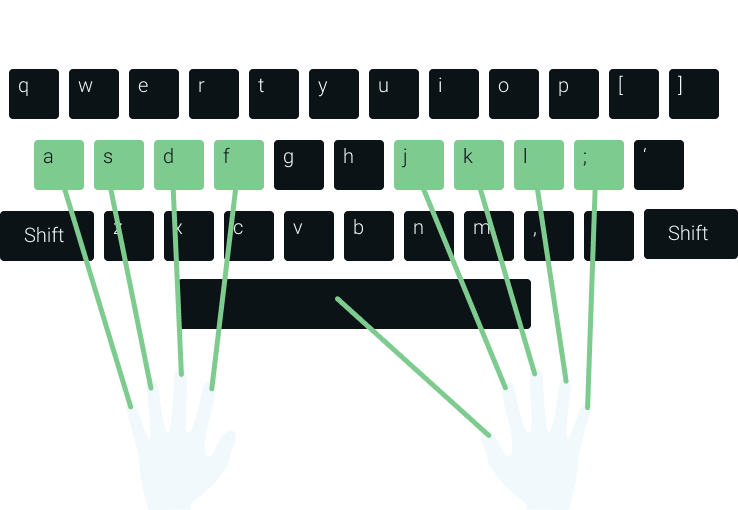
1. Put your left hand fingers on keys A S D F (See picture).
2. Put your right hand fingers on keys J K L ; (See picture).
3. Let the thumbs rest lightly on the space bar.
4. Keep your wrists straight and fingers lightly curled.
Using the Shift Keys
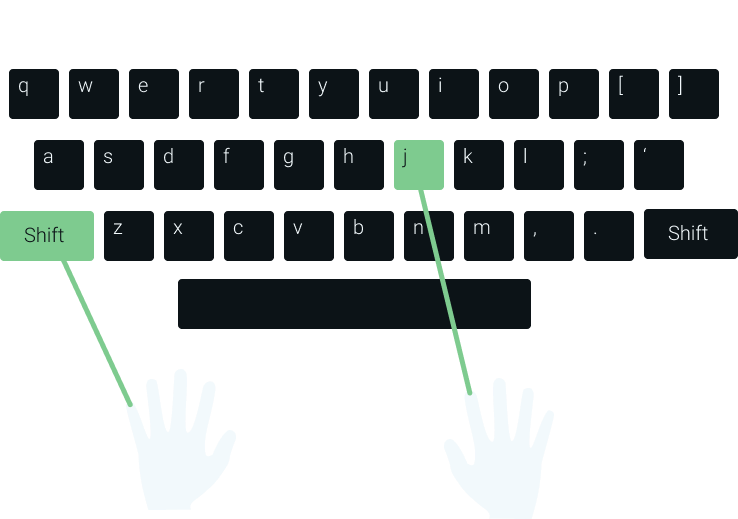
Capital Letters are typed using both hands: one for the Shift key and the other for the letter key. Press and hold Shift at the same time as you tap the letter.
Rule: The Shift keys are always pressed using your little fingers.
Example (Capital J):
1. Place fingers on home row keys.
2. Hold the left Shift key down using your left little finger.
3. Taps J with your right index finger.
4. Release Shift and resume normal typing.
Learning Tips
Eyes on Screen
Avoid peeking at the physical keyboard. Relying on muscle memory rather than sight is critical to touch typing.
Keep Wrists Up
Keep your wrists straight and floating. Resting them on the desk causes muscle strain and hampers finger mobility.
Focus on Accuracy
Speed comes naturally from practice. Focus heavily on accuracy first; speed follows correct muscle memory.